



TL;DR
- Inventory is the stock you have to sell, and every marketplace keeps its own count of it.
- Sell on several marketplaces and those counts drift apart. That leads to overselling, cancellations, late dispatch and weaker account health.
- The fix is one master SKU per product with child SKUs for each marketplace, all sharing one stock count.
- Returns go back into stock only after a check. Cancellations free their units again.
- Safety stock covers the gap between a sale and the next update. Real-time sync keeps that gap short.
- HappySellers Inventory Sync fetches your Amazon, Flipkart and Myntra catalogs, matches the same product across them and lets you update stock everywhere from one place.
You sell a black shirt on Amazon, Flipkart and Myntra. You have 100 in your warehouse. An order comes in on Flipkart, you pack it, and now you have 99. But Amazon and Myntra still say 100. Multiply that by hundreds of products and thousands of orders, and you have the most common problem in online selling.
This article explains what inventory sync is, why it matters, how sellers do it today and how to do it better. If you would rather let software keep the count, HappySellers Inventory Sync brings your marketplace catalogs into one place with one stock number per product. You can try it free with your own accounts.
It is written for every seller: new sellers listing their first products, and sellers already on three, five or more marketplaces.
What is inventory, and why is it the heart of every marketplace?
Inventory is simply the products you have in stock and ready to sell. Shirts, mobiles, bottles, anything. To sell on a marketplace, you register each product there, and you tell the marketplace how many units you have.
If you have 100 black shirts in your warehouse, you set the inventory to 100. When one order comes and you process and pack it, the count should become 99. That is inventory management at its simplest: the number on the marketplace must match the products on your shelf.
On every e-commerce platform, inventory is the one thing that cannot go wrong. Show too much and you sell products you do not have. Show too little and you lose sales you could have made.
Single-channel vs multichannel inventory
When you sell on one marketplace, keeping the count right is easy. One order, one update.
When you sell on many marketplaces, it becomes multichannel inventory. Amazon, Flipkart, Myntra, Meesho, Ajio, Nykaa, Snapdeal and your own website all sell from the same shelf, but each one keeps its own separate count. None of them knows what sold on the others. That is why sellers need inventory sync.
Why inventory synchronization is important
Inventory sync means keeping the stock count the same, and true, on every marketplace. A sale, return or cancellation on one marketplace should change the stock everywhere.
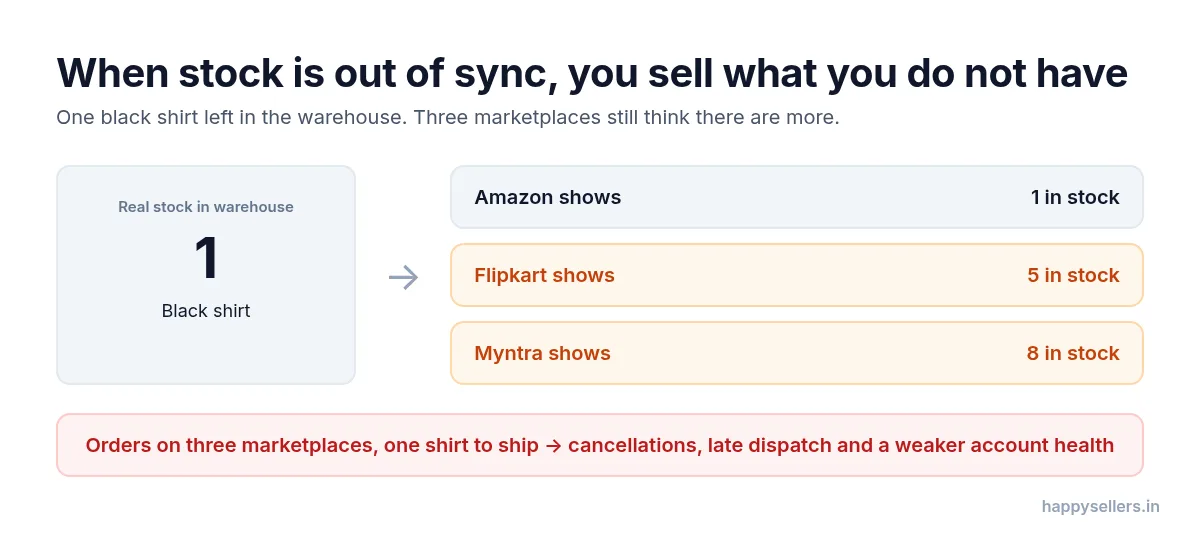
When the counts are not in sync, here is what happens:
- Overselling. Two or three marketplaces sell the same last unit, but you can ship only one.
- Seller cancellations. With no stock, you have to cancel the order from your side. Marketplaces track seller-side cancellations, and too many of them hurt your account health.
- Breached dispatch. If you try to arrange stock and cannot ship within the marketplace’s dispatch time, the order is breached. That also counts against your account health.
- Lost sales. The opposite problem: stock sits in your warehouse while a marketplace shows zero.
A weak account health can mean less visibility for your listings and, in serious cases, restrictions on your account. Every marketplace sets its own rules, so check the account health page in each seller panel.
How sellers manage inventory today
Most sellers start by hand. There are three common ways.
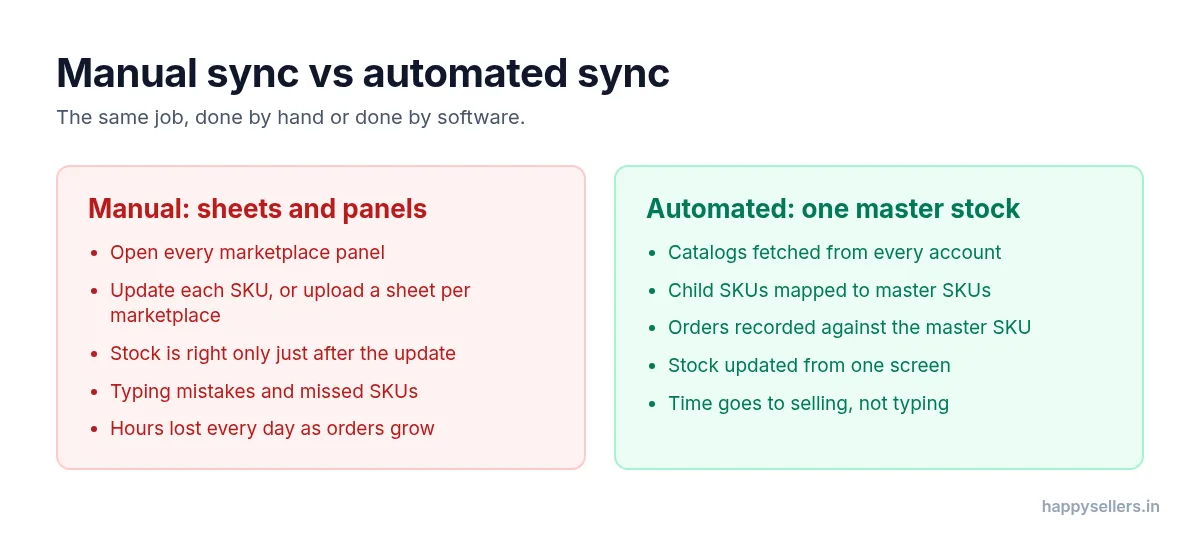
- Updating each product in each panel. The seller visits each marketplace, finds each product and types in the new stock. One product at a time, one marketplace at a time.
- One sheet per marketplace. The seller keeps a separate Excel sheet for each marketplace and uploads it through that marketplace’s bulk stock upload.
- One master sheet for everything. The seller keeps one sheet with master SKUs, child SKUs for each marketplace and their quantities, then works out how many units to add or subtract, and uploads the result to every marketplace. Some sellers use a script or an import-export tool to do the uploads.
All three work when you have a few products. Now picture a seller with 1,000 products and 1,000 orders a day. First the team does the physical work: picking, packing and shipping. Then someone has to update the stock for every one of those orders on every marketplace. That takes hours every day, and the stock is right only for a short time after each update.
Common inventory sync problems
- Delays. Between a sale and your next update, every other marketplace keeps selling.
- Typing mistakes. One wrong number in a sheet, and a product oversells or shows zero.
- Missed SKUs. A size or colour gets skipped in the upload.
- Different SKU codes. The same shirt has a different code on each marketplace, so matching rows in a sheet is slow and easy to get wrong.
- Returns and cancellations forgotten. Units come back, but nobody adds them to stock.
Stop copying stock numbers between marketplace panels. HappySellers pulls your Amazon, Flipkart and Myntra catalogs into one place, matches the same product across them and gives you one master stock to manage. Start free with HappySellers, with free trial credits and no card required.
SKUs and product mapping: master SKU and child SKUs
A SKU (stock keeping unit) is the code that identifies one exact product, down to its size and colour. The trouble is that the same product often carries a different SKU on each marketplace.
That is where master SKUs and child SKUs come in:
- The master SKU is your own code for the real product. For example, a black shirt in size M.
- The child SKUs are the codes the same product carries on each marketplace. The black shirt might be one code on Amazon, another on Flipkart and a third on Myntra.
- A master product groups the master SKUs of one product, such as the black shirt in every size.
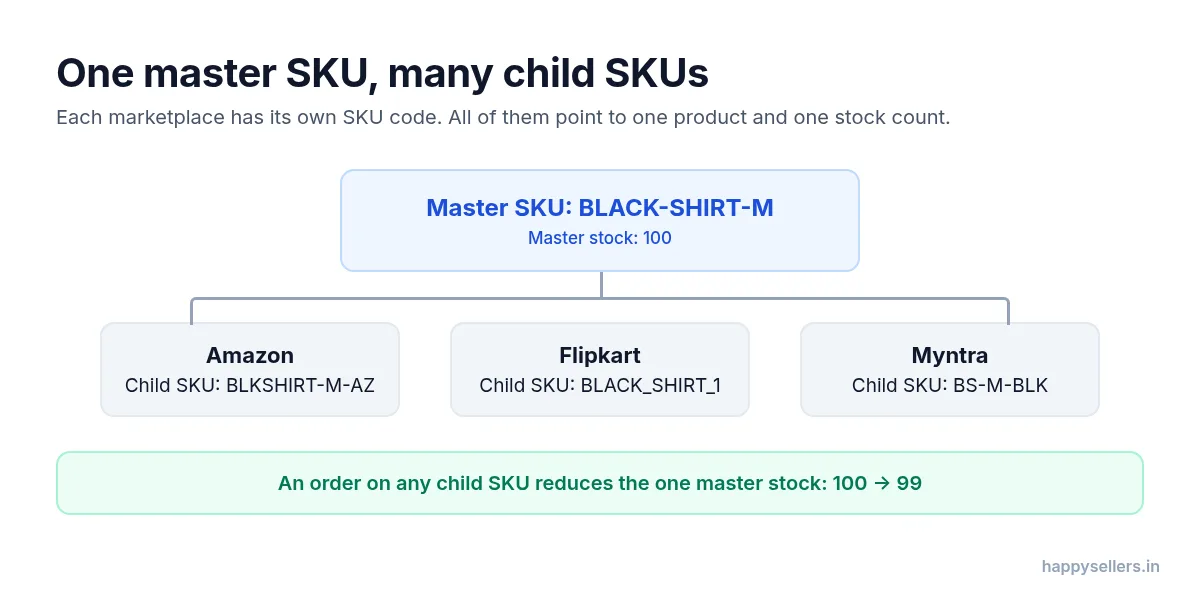
Linking each child SKU to its master SKU is called SKU mapping or product mapping. Once it is done, the master quantity is the one number that matters. An order on any child SKU reduces the master stock, and every marketplace can be updated from it. Without mapping, true sync is not possible, because the system cannot tell that three different codes are the same shirt.
Stock in, stock out: orders, returns and cancellations
A stock count changes for more reasons than orders. Good sync handles all of them.
- Orders take units out of stock.
- Cancellations before dispatch free those units again.
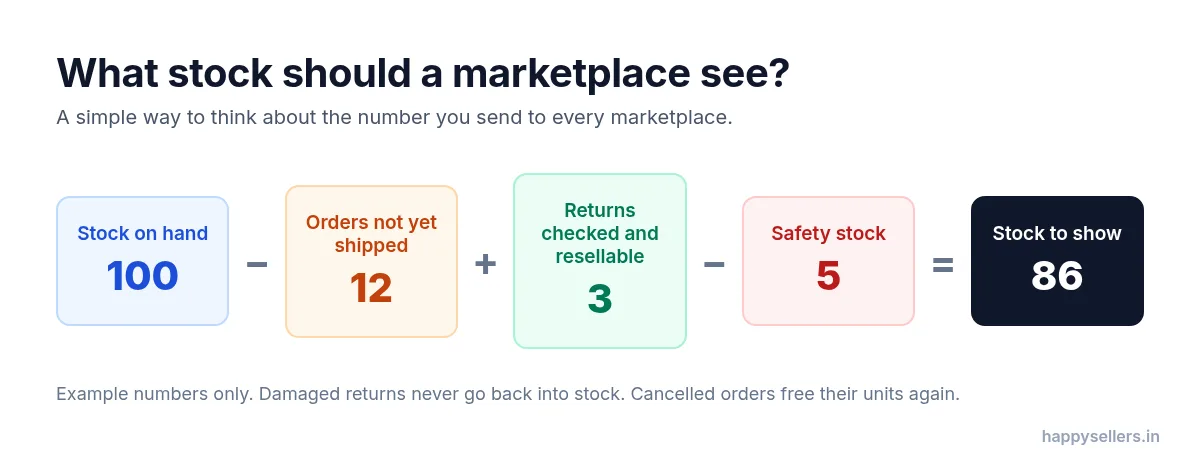
- Returns can come back into stock, but only after a check. Open the parcel, confirm it is the right product and that it is good to sell again, and only then add it back. A damaged or wrong return must never go back into sellable stock, or the next buyer receives it.
Safety stock
Safety stock is a small buffer you keep in the warehouse but do not show on any marketplace. If you have 100 shirts, you might show 95 and hold 5 back.
Why hide stock you have? Because no sync is instant. Between a sale and the next update, other marketplaces can still sell. Safety stock covers that gap, plus surprises like a damaged unit found while packing. The faster your sync, the smaller the buffer you need.
Multiple warehouses and inventory allocation
If you ship from more than one warehouse, keep a separate count for each one. A marketplace order is shipped from a particular warehouse, so its stock is the one that changes. Some sellers also allocate stock, deciding how much of each warehouse’s stock each marketplace may sell. Whatever you choose, write the rule down and apply it the same way every day.
Inventory reconciliation
Even good sync drifts over time: a miscount, a lost parcel, a return nobody logged. Inventory reconciliation means counting what is really on your shelves and correcting the system to match. Do it on a regular schedule, and always before a big sale.
Real-time sync vs scheduled sync
There are two ways software can keep marketplaces in sync.
- Real-time sync. When an order comes in, the master stock changes and every marketplace is updated within moments.
- Scheduled sync. Orders are processed as usual, and stock is updated at set times: every few minutes, every hour or once a day.
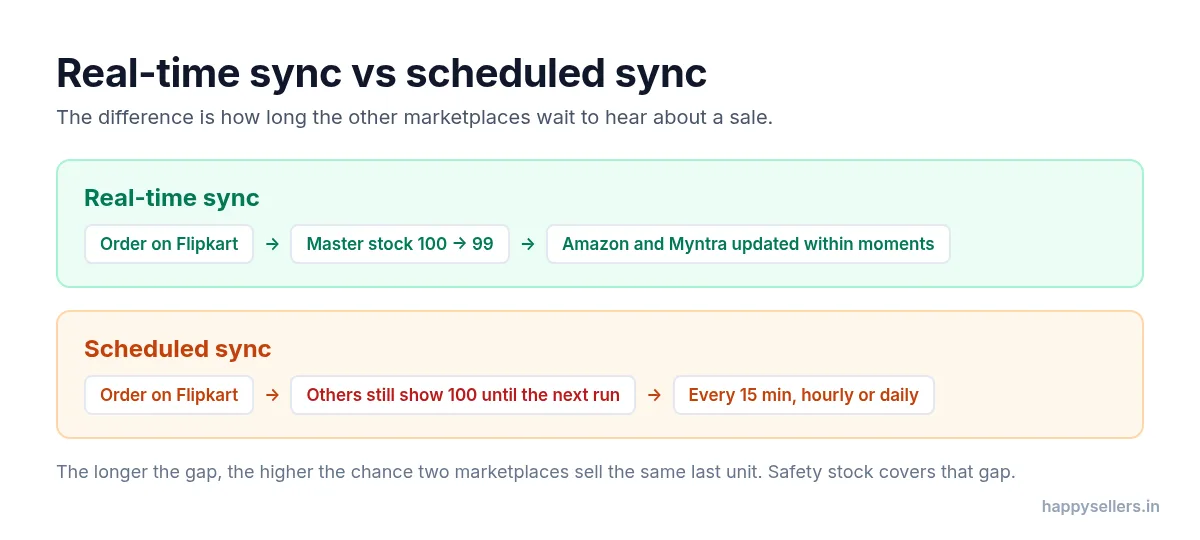
Real-time sync is the safer choice for fast-moving products and sale days. Scheduled sync can be enough for slow-moving products, as long as you keep safety stock to cover the gap.
What about virtual inventory?
Virtual inventory is the opposite of safety stock. Instead of showing less than you have, you keep showing a set stock when real stock runs low.
Say you have 10 black shirts left and orders keep coming. With virtual inventory, the listing keeps showing stock, so you can keep taking orders while you arrange more shirts, instead of going out of stock or cancelling. It works only when you are sure you can restock before the dispatch deadline. Otherwise it creates the very cancellations and breaches you were trying to avoid.
Virtual inventory is coming soon to HappySellers, with alerts when a product starts selling on virtual stock, so you know exactly when to arrange more.
How HappySellers keeps your inventory in sync
HappySellers Inventory Sync works with Amazon, Flipkart and Myntra today, and more marketplaces are being added.
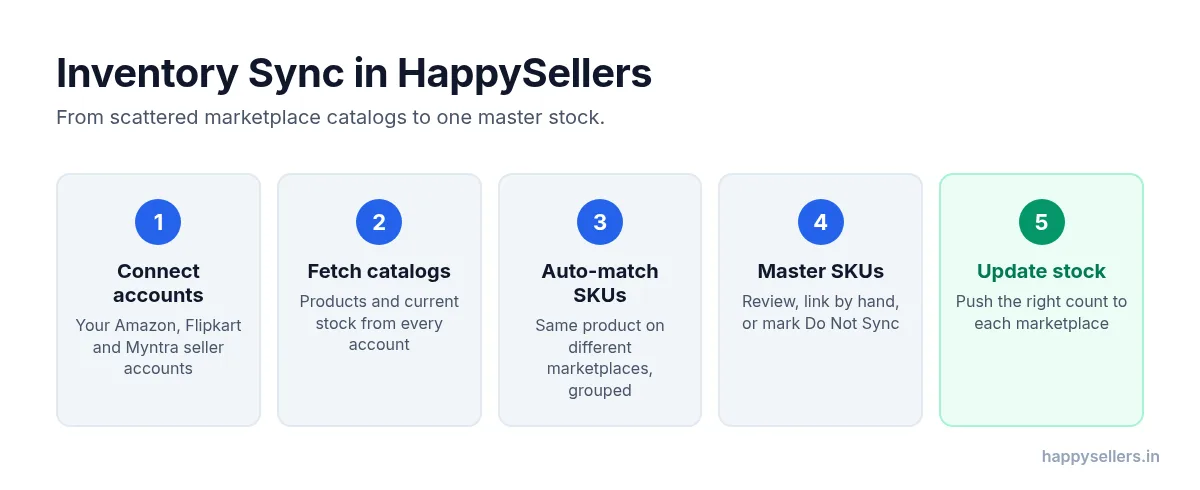
- Your catalogs in one place. Connect your marketplace accounts, and HappySellers fetches every product with its current stock. A Sync button fetches them again whenever you need.
- Automatic SKU matching. HappySellers spots the same product across marketplaces, even when the SKU codes differ, and groups it under one master product and master SKU.
- You stay in control. Link or unlink a child SKU by hand, merge two products that should be one, or turn a product left unmatched into its own master SKU.
- Do Not Sync. Mark a SKU that must never be touched, and it stays out of syncing until you move it back.
- Sync only what you choose. Syncing is switched on for each master SKU and each marketplace SKU, so nothing changes until you say so.
- Orders against the master SKU. Orders from your connected marketplaces are recorded against the master SKU, so you see what each product really sold.
- Update stock from one screen. Set the right count and push it to the marketplace, without opening each seller panel.
One stock count for every marketplace. See every product, every child SKU and every stock count in one dashboard, and stop overselling the last unit. Create your free HappySellers account and connect your first marketplace today. Questions first? Talk to us.
Benefits of automated inventory management
- No overselling and fewer seller cancellations.
- Healthier accounts, with fewer breached dispatches.
- Hours saved every day that went into sheets and panels.
- Fewer mistakes, because nobody retypes numbers.
- Room to grow. Adding a new marketplace no longer means a new sheet to maintain.
What to look for in inventory management software
- Support for the marketplaces you sell on, and the ones you plan to join.
- Automatic SKU mapping across marketplaces, with manual control when it gets it wrong.
- Master SKUs and master products, with one stock count each.
- Stock updates pushed to marketplaces, not only read from them.
- Handling of returns and cancellations.
- Safety stock and support for multiple warehouses.
- Order processing in the same place, so stock and orders never disagree. HappySellers also processes orders in bulk across marketplaces; see how in our guide to printing shipping labels in bulk.
For sale-season planning, read our guide to the Flipkart, Amazon and Myntra sale season. For a faster packing floor, see SKU-wise packing, and for lessons on growing stock control, read scaling your e-commerce inventory management.
Quick summary
- Every marketplace keeps its own stock count. Sync keeps them the same and true.
- Out-of-sync stock causes overselling, cancellations, breached dispatch and weaker account health.
- Manual sync with panels and sheets works small but breaks as orders grow.
- Map every child SKU to one master SKU with one master quantity.
- Add returns back only after a check. Cancellations free units again.
- Keep safety stock, prefer real-time sync and reconcile regularly.
- HappySellers Inventory Sync brings Amazon, Flipkart and Myntra into one place, matches SKUs and updates stock from one screen. Virtual inventory is coming soon.
Frequently Asked Questions
What does it mean to sync inventory across marketplaces?
It means every marketplace shows the same, true stock for a product. When a unit sells, returns or gets cancelled on one marketplace, the stock on every other marketplace changes to match, so you never sell a unit you do not have.
What is the difference between a master SKU and a child SKU?
The master SKU is your own code for the real product, like a black shirt in size M. Child SKUs are the codes the same product carries on each marketplace. Every child SKU points to the one master SKU and its one stock count.
What is safety stock and why should I keep it?
Safety stock is a small buffer you hold back and do not show on marketplaces. It covers the gap between a sale and the next stock update, and surprises like damaged units, so a late update does not turn into an oversold order.
Should returned products go back into stock right away?
No. Add a returned unit back only after it is checked and found good to sell again. Damaged or wrong returns should never go back into sellable stock.
Is real-time sync better than scheduled sync?
Real-time sync is safer because other marketplaces hear about a sale within moments. Scheduled sync updates every few minutes or hours, which leaves a gap where two marketplaces can sell the same last unit. If you use scheduled sync, keep safety stock.
Can I sync inventory using an Excel sheet?
Yes, many sellers keep one sheet with master SKUs, child SKUs and quantities and upload it to each marketplace. It works at small scale, but the stock is only right just after each upload, and it gets slow and error-prone as orders grow.
Which marketplaces does HappySellers Inventory Sync support?
Inventory Sync works with Amazon, Flipkart and Myntra today, and more marketplaces are being added. HappySellers order processing already covers Meesho, Ajio, Nykaa, Snapdeal and more.
What is virtual inventory?
Virtual inventory lets a product keep showing a set stock when real stock runs low, so you can keep taking orders while you arrange more stock instead of cancelling. Use it only when you are sure you can restock in time. It is coming soon to HappySellers.