TL;DR
- Printing labels one by one is slow. Process, print and pack each order, and every step repeats for every order.
- Bulk printing is faster. Process all orders, print all labels once, then pack them together.
- Flipkart lets you download labels for up to 100 orders in one PDF. 400 orders means four downloads.
- Amazon SellerFlex and Myntra M-Direct give you one label per order, after scanning and checks for every order.
- Meesho allows bulk downloads, with limits of its own.
- HappySellers processes orders in bulk on Flipkart, Amazon, Myntra, Meesho, Ajio, Nykaa and Snapdeal, and gives you one PDF of labels and invoices, sorted by SKU, with the SKU printed on the label.
The orders are in and the courier is coming. Now you need a shipping label for every parcel. If you get those labels one at a time, your packing day is already slower than it needs to be.
This guide shows how to print shipping labels in bulk, what each marketplace allows, and how to get every label in one sorted PDF. If you want to skip the manual work, HappySellers processes your orders in bulk and hands you every label at once. You can try it free on your real orders.
It is written for new sellers shipping a handful of orders a day and for teams shipping 50 or more orders a day. The problem is the same at both sizes. It just costs more hours as you grow.
Why print shipping labels in bulk?
Printing labels one after another is not a good way to work, because it takes more time.
Here is what one-by-one printing looks like. You process the first order, and you get its label. You process the second order and get the second label. Then the third. Each order is processed, printed and kept aside before you touch the next one.
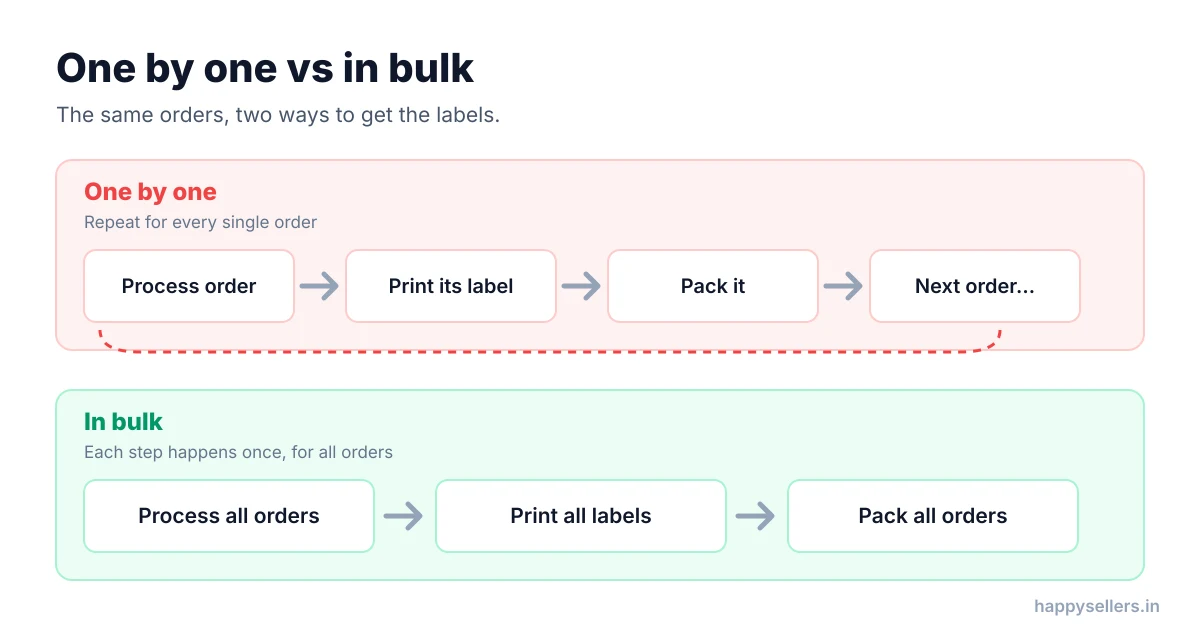
Now compare it with bulk printing. You process all your orders first. When processing is done, you collect every label at the end and print them in one go. Then you start packing, and you pack all the orders together.
Many new sellers go one step further and pack each order right after printing its label: process one order, take its label, pack it, then process the next. That is the slowest way of all, and the constant switching between screen, printer and packing table is where mistakes creep in.
Bulk printing fixes both problems:
- Less time. Processing, printing and packing each happen once, not once per order.
- Fewer mistakes. Your team packs from one stack of labels instead of jumping between tasks.
- Faster packing. When labels come out sorted, packers can work through them in order. Our guide to SKU-wise packing explains why that matters.
What each marketplace allows for bulk label printing
Every marketplace handles labels differently. Some allow bulk downloads with a cap. Some give you only one label at a time.
Flipkart: up to 100 labels at a time
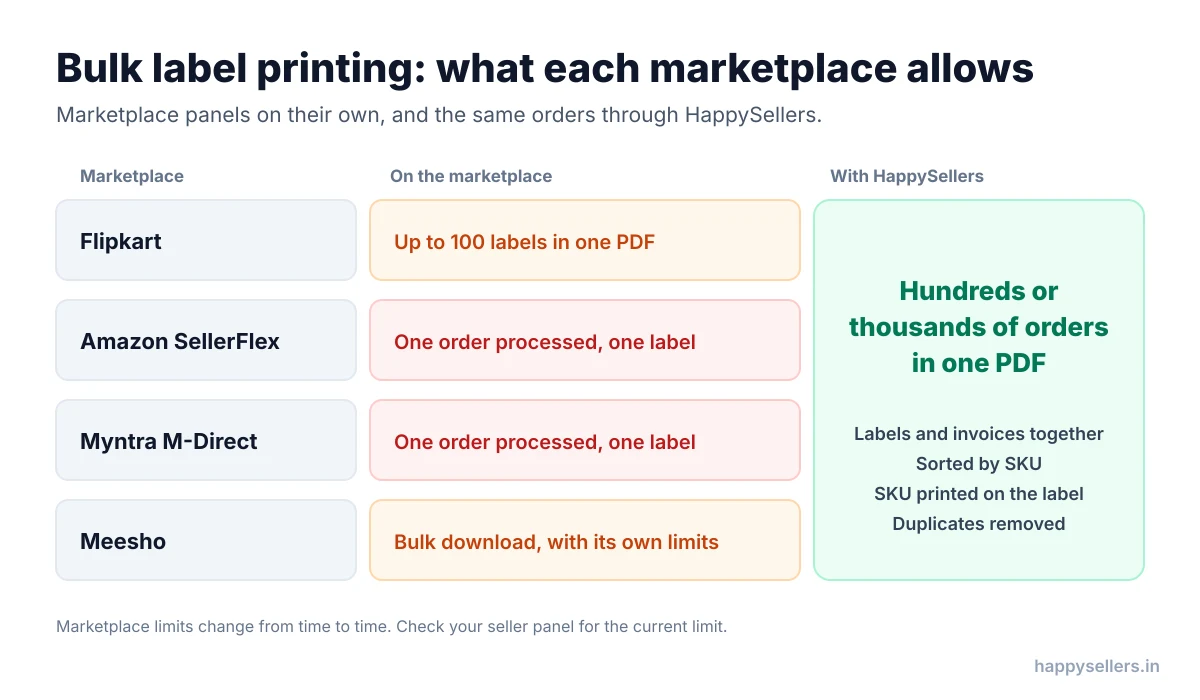
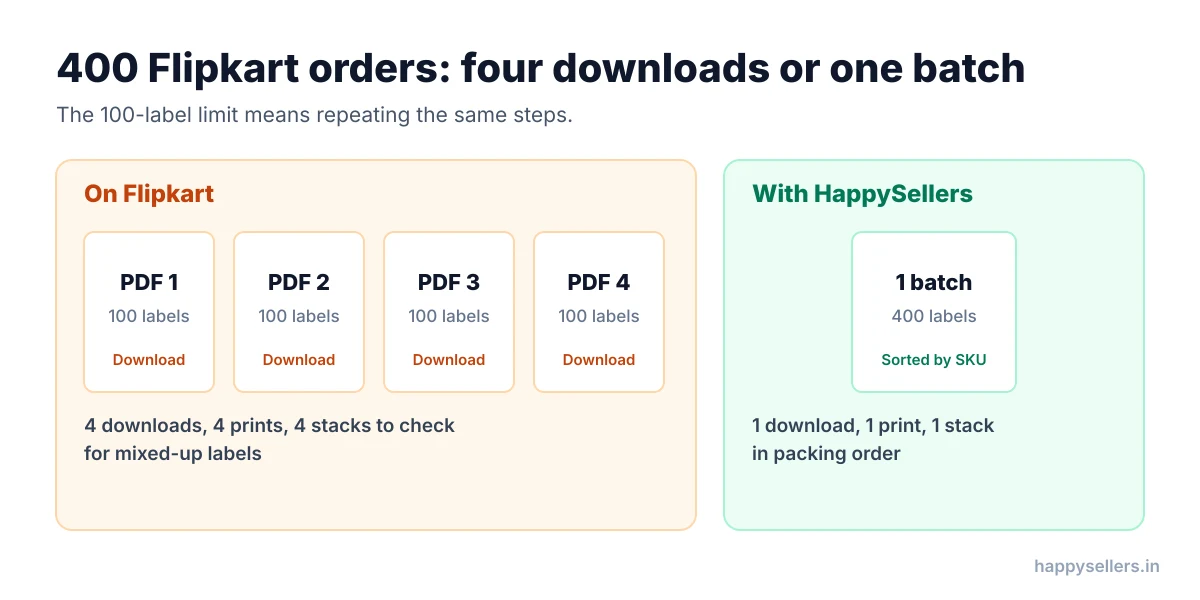
Flipkart does offer bulk label printing, but it is limited. You can download labels for up to 100 orders in one PDF. More than 100 in one go is not possible.
Orders do not go missing because of this. The cost is repetition. If you processed 400 orders, you download labels four times, in batches of 100. Each round repeats the same steps, and each PDF needs checking, because labels from different rounds can get mixed up.
Flipkart’s PDF also merges labels and invoices, but it does not sort the labels by SKU. Your packers get them in the order Flipkart puts them.
Amazon SellerFlex and Myntra M-Direct: one order, one label
On Amazon SellerFlex and Myntra M-Direct, bulk label printing is not possible. You process one order and get one label, then do the next order.
Processing each order also takes several steps:
- Amazon SellerFlex: scan the pick list, scan the SKUs for each order, add the box type, and only then get the label.
- Myntra M-Direct: scan the SKUs, pass the QC check, and only then get the label.
These steps repeat for every single order. The label and the invoice also come as separate files, not merged into one PDF. Our guides to Amazon SellerFlex order processing and Myntra order processing go deeper into both.
Meesho: bulk, with its own limits
Meesho also lets you process orders and download labels in bulk, but it sets limits of its own. Check your Meesho seller panel for the current limit before a big sale day.
Stop printing labels one order at a time. HappySellers processes your Flipkart, Amazon, Myntra, Meesho, Ajio, Nykaa and Snapdeal orders in bulk and gives you every label in one PDF. Start free with HappySellers, with free trial credits and no card required.
Common mistakes when printing labels in bulk by hand
Even where a marketplace allows bulk downloads, doing it by hand has risks. The two most common:
- Missed orders. When you download labels in several rounds, it is easy to skip one round or a few orders. Those parcels never leave on time.
- Duplicate labels. Download the same orders twice and you print the same label twice. That wastes label rolls and confuses packers.
Other mistakes come from the label stack itself. Unsorted labels mean packers walk back and forth between racks. Labels without a SKU mean packers check the invoice for every parcel. And multi orders mixed into the stack get packed in a hurry. The sections below cover each one.
How to print shipping labels in bulk with HappySellers
HappySellers supports bulk order processing on Flipkart, Amazon, Myntra, Meesho, Ajio, Nykaa and Snapdeal. The steps are the same everywhere.
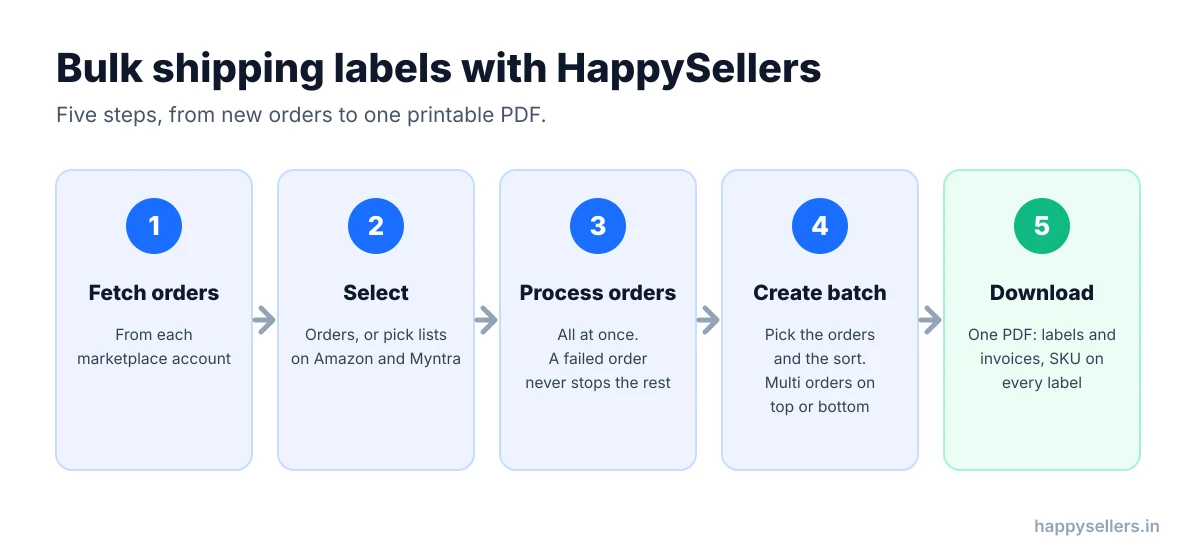
- Fetch your orders from each marketplace account.
- Select the orders you want to process. For Amazon and Myntra, select the pick lists instead.
- Click Process Orders. HappySellers processes every selected order. You do not scan or click through each one.
- Create a batch. Select the processed orders whose labels you want, choose how to sort them, and choose where multi orders go.
- Download one PDF with all the labels and invoices, ready to print.
That is it. On Flipkart, where the marketplace stops at 100 labels, HappySellers can put 500, 1,000 or more orders in one batch. If you get 1,000 orders, you process 1,000 orders at once. If you get 2,000, you process 2,000.
What if one order fails?
Sometimes a marketplace refuses one order. That does not affect the other orders. The rest are processed, and you create your batch from them. Then you process the failed order again in the next bulk run.
What if the print fails?
Your batch stays in your HappySellers dashboard. If the printer jams or the paper runs out, download the batch again and reprint it.
One click for every order, one PDF for every label. No 100-label cap, no order-by-order scanning, no separate label and invoice files. Create your free HappySellers account and print your next batch in one go.
What you get in a HappySellers label batch
A bulk PDF is only half the job. How the labels are arranged decides how fast your team packs.
Labels and invoices in one PDF
Amazon SellerFlex and Myntra M-Direct give you a label and an invoice as separate files for each order. HappySellers gives you labels and invoices together in one PDF, so you print once.
Labels sorted by SKU or by order count
Your orders always arrive mixed: SKU 1, then SKU 2, then SKU 1 again. If packers follow the labels in that order, they keep walking back to the same rack.
HappySellers sorts the batch by SKU or by SKU order count, so all the labels for one product sit together. The packer goes to the rack once, collects the full quantity, and packs every order for that SKU. Less walking, less time, less effort. On Meesho you can also sort by courier, and on Flipkart you can split a batch by logistics partner, with one PDF for each.
The SKU printed on the label
Myntra labels and Amazon Easy Ship labels from Seller Central do not show the SKU. A packer holding the label has an address and a barcode, but nothing that says which product goes inside. So they check the invoice for every parcel.
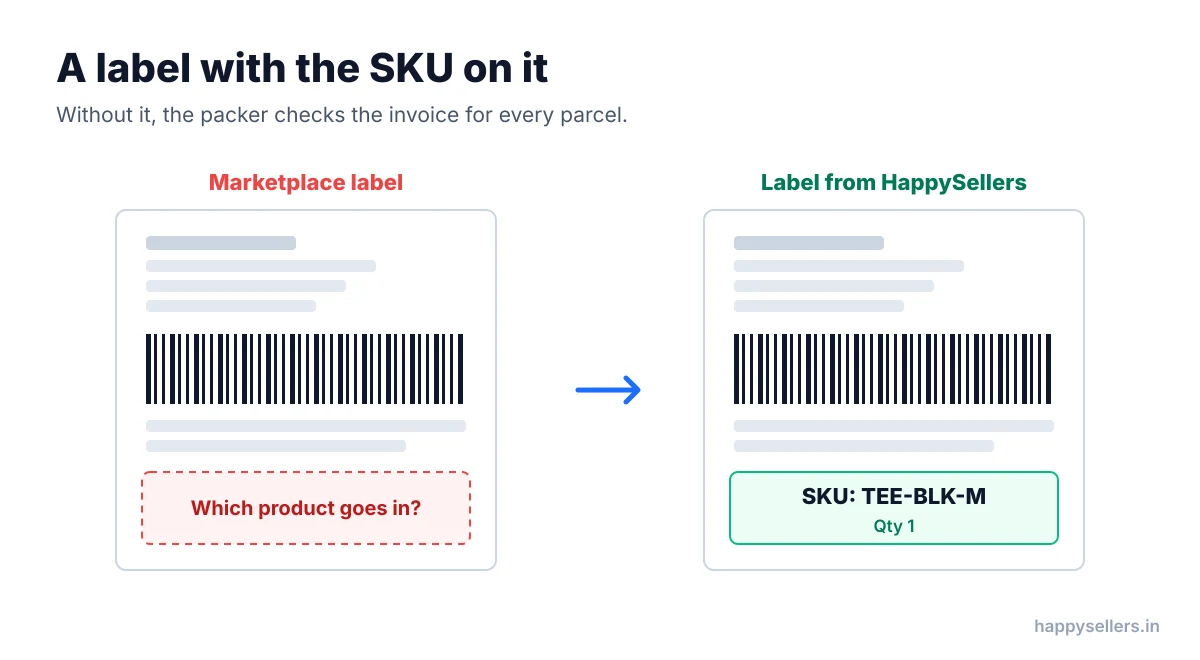
HappySellers prints the SKU on the label. The packer reads it and packs, with no second sheet to check. On Myntra you can even print the invoice at label size, so the whole batch fits a 4×6 inch label printer.
Multi orders on top or at the bottom
Multi orders are orders with more than one product in them. In a normal bulk PDF, they turn up anywhere in the stack: the middle, the end, the start.
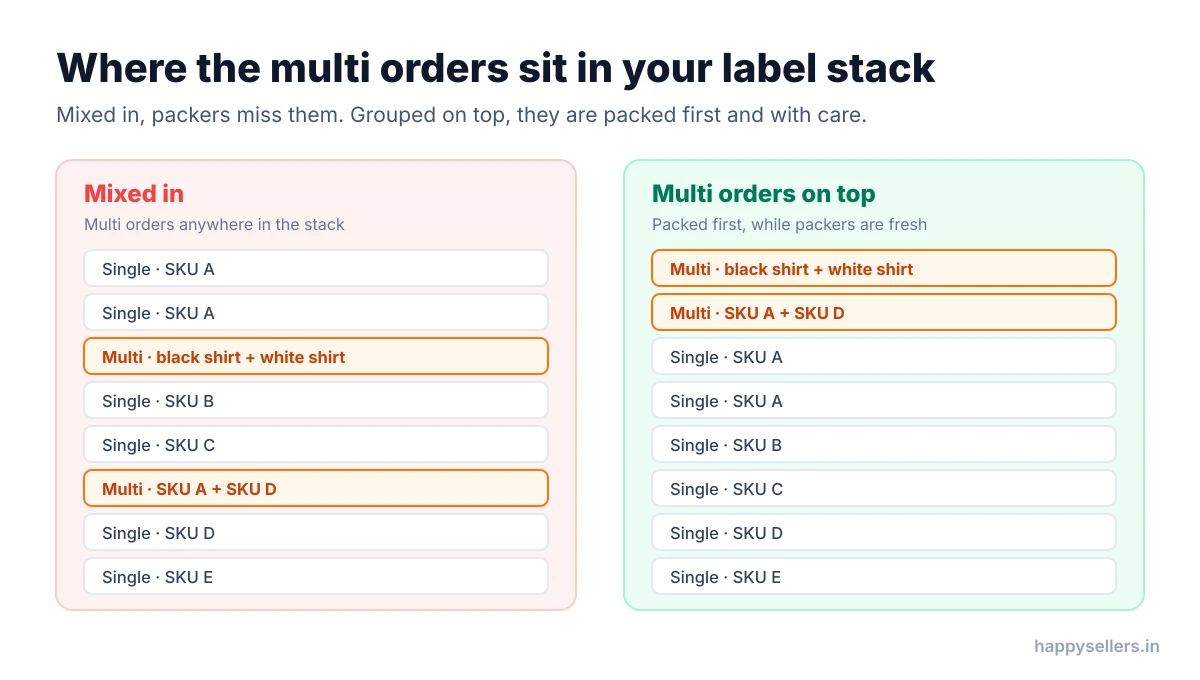
HappySellers lets you move all multi orders to the top or the bottom of the batch on Flipkart, Amazon and Myntra.
A seller story: fewer packing mistakes with multi orders on top
One seller was already printing labels in bulk. The trouble was the multi orders. They sat at random places in the stack, and packers working fast did not notice them.
The result was packing mistakes. Sometimes a product was missing from a multi order. Sometimes the wrong product went in. A buyer orders one black shirt and one white shirt, and receives one white shirt and one orange shirt.
The seller started creating batches with multi orders at the top. Now packers know that the first labels are multi orders, and they pack them while they are fresh and full of energy at the start of the session. They take more care, and the mistakes dropped.
Other teams prefer the bottom: pack all the single orders first, then slow down for the multi orders at the end. Either way, packers know where the multi orders are, and that is what stops the mistakes.
Your sale day does not have to mean late dispatch. Bulk processing, one PDF, labels sorted by SKU, the SKU on every label and multi orders where you want them. Sign up for HappySellers and try it with free trial credits. Questions first? Talk to us or see the pricing.
How HappySellers keeps labels from going missing or doubling up
The two classic bulk printing mistakes are handled for you:
- Duplicates are removed. HappySellers detects duplicate orders and leaves them out of the batch PDF, so the same label is not printed twice.
- Batched orders are not offered again. Once an order is in a batch, it does not show up for the next batch. You will not print it twice by accident.
- Failed orders stay visible. An order that did not process stays on your screen, so you can process it again instead of losing it.
For busy weeks, read our guide to the Flipkart, Amazon and Myntra sale season, and see how bulk processing works for Flipkart smart orders. For a wider view, see online order processing software or browse the HappySellers docs.
Quick summary
- Print shipping labels after processing all orders, not one order at a time.
- Flipkart: up to 100 labels per PDF, not sorted by SKU.
- Amazon SellerFlex and Myntra M-Direct: one order and one label at a time, with separate label and invoice files.
- Meesho: bulk downloads with its own limits.
- Bulk printing by hand risks missed orders and duplicate labels.
- HappySellers: bulk processing on seven marketplaces, one PDF of labels and invoices, sorting by SKU, the SKU on the label, multi orders on top or bottom, and duplicates removed.
Frequently Asked Questions
Can I print shipping labels in bulk on Flipkart?
Yes, but Flipkart lets you download labels for up to 100 orders in one PDF. With 400 orders you repeat the download four times and check four separate stacks. HappySellers puts all of them in one batch.
Can I print Amazon or Myntra shipping labels in bulk?
Not on Amazon SellerFlex or Myntra M-Direct themselves. You process one order at a time, scanning the pick list and the SKUs, choosing the box on Amazon or passing QC on Myntra, and only then get that order’s label. HappySellers processes the orders in bulk and gives you every label in one PDF.
Why should I print all labels at the end instead of one by one?
Because each step then happens once. Process every order first, print every label in one go, and pack all the orders together. Processing, printing and packing one order at a time takes much longer and leads to more mistakes.
Is there a limit on how many labels HappySellers puts in one batch?
There is no 100-label cap. Process all your orders in bulk and create a batch of hundreds or thousands of orders, with every label in one PDF.
Does HappySellers print the SKU on the shipping label?
Yes, where the marketplace does not. Myntra and Amazon Easy Ship labels do not show the SKU, so HappySellers prints it on them. Packers no longer need the invoice to know which product goes in the parcel.
What happens if one order fails during bulk processing?
The other orders still go through. You create the batch for the processed orders and process the failed order again later. One failure never blocks the rest.
Can I get duplicate labels when I print in bulk?
Printing by hand, in several downloads, makes duplicate or missed labels easy. HappySellers removes duplicate orders from the batch PDF, and an order already in a batch is not offered for a new one.
Can I reprint a batch if the printer fails?
Yes. A HappySellers batch stays in your dashboard, so you can download it and print it again.